
How to Transfer a Call Directly to a Coworker’s Voicemail
Watch this video or use the instructions below to learn how you can use Microsoft Teams to transfer a call directly to a colleague’s voicemail.
Full Transcript:
- In Microsoft Teams, you can now transfer a call to a colleague’s voicemail. One caveat I want to mention up front is you will need an Office 365 Calling Plan and Phone System license to be able to do this.
- I have a call open on my screen. To transfer, I’ll select the More Options icon, and then transfer.
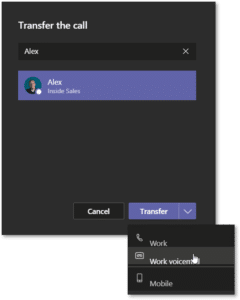
- Here, I can search for and select the colleague I want to transfer this call to.
- Then, I’ll select Work Voicemail from the transfer options.
- Teams will let me know the call is being transferred and when the transfer is complete.
- That’s how you transfer a call to a colleague’s voicemail in Microsoft Teams.
If you field calls for your organization, or if you’re the target of constant spam calls that come into your organization’s front desk. You’ll be happy to know that Microsoft has added the ability to transfer calls to another colleague’s voicemail directly.
Say goodbye to the days of frantic IMs telling your coworkers, “Don’t answer this call!”
If you’re using Teams as your phone system—either via Direct Routing or Office 365 Calling Plan and Phone System licenses—you’ll have this ability in your Teams client without changing any settings.
We will offer the disclaimer that this feature is not supported in the Teams mobile app. We can all hope for this feature to be added soon, but in the meantime, you’re stuck frantically messaging your coworkers to ignore a transferred call.
How to Transfer a Call to a Coworker’s Voicemail
- While in a call in Microsoft Teams, select the More Actions
- From the list, select Transfer.
- In the flyout window, search for the colleague you want to transfer this call to using the search bar.
- When you find who you’re looking for, select the contact by clicking on them.
- At the bottom of the flyout window, select the dropdown next to Transfer.
- Select Work Voicemail from the list.

- Teams will let you know the call is being transferred and when the transfer is complete.
Teams continues to add more complex functionality, so check back here for new features and upgrades!