
Dataprise Defense Digest
ID: D3-2023-0006-1
Severity: 9.8 (Critical)
Published: March, 16th 2023
EXECUTIVE SUMMARY
A critical Microsoft Outlook vulnerability for Windows (CVE-2023-23397) has been discovered, which allows hackers to remotely steal hashed passwords by simply sending a malicious email. Microsoft has released a patch, but the vulnerability has already been exploited as a zero-day in NTLM-relay attacks since mid-April 2022. The issue affects all versions of Microsoft Outlook on Windows and has a severity rating of 9.8.
IMPACT
This privilege escalation vulnerability allows attackers to steal NTLM credentials by sending a malicious email to the target. No user interaction is needed, as exploitation occurs when Outlook is open and the reminder is triggered on the system. Stolen NTLM hashes can be used to perform NTLM relay attacks, granting deeper access to corporate networks. According to Microsoft, a Russia-based threat actor believed to be APT28 has exploited the vulnerability against several European organizations in government, transportation, energy, and military sectors.
DETAILED ANALYSIS
Windows New Technology LAN Manager (NTLM) is an authentication method used to log in to Windows domains using hashed login credentials. Although NTLM authentication comes with known risks, it is still used on new systems for compatibility with older systems.
Microsoft explained that an attacker could use CVE-2023-23397 to obtain NTLM hashes by sending a message with an extended MAPI property containing a UNC path to an SMB share on a threat actor-controlled server. Researchers at security consulting company MDSec discovered that the “PidLidReminderFileParameter” property inside received mail items could be leveraged in this attack.
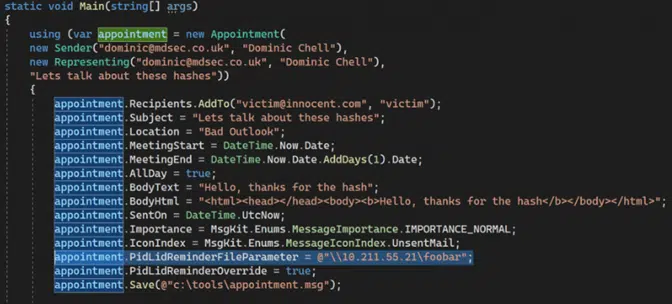
Dominic Chell, a red team member at MDSec, found that this property allows the sender to define the filename that the Outlook client should play when the message reminder is triggered. Chell also discovered that the “PidLidReminderOverride” property could be used to make Microsoft Outlook parse a remote, malicious UNC path in the “PidLidReminderFileParameter” property. This enabled the creation of a malicious Outlook email with a calendar appointment that triggers the vulnerability and sends the target’s NTLM hashes to an arbitrary server. MDSec shared a video demonstrating this proof of concept here.
MITIGATION STEPS
To mitigate the risks associated with CVE-2023-23397, organizations should take the following steps:
- Apply the patch: Administrators should prioritize patching CVE-2023-23397 by downloading and installing the latest security updates from Microsoft.
- Check for signs of exploitation: Use Microsoft’s script to check for signs of exploitation by verifying if messaging items in Exchange come with a UNC path.
- Educate users: Inform users about the risks associated with this vulnerability and advise them not to open suspicious emails or click on links from unknown senders.
- Monitor network activity: Regularly monitor and analyze network activity for signs of unauthorized access, and promptly investigate any suspicious activity.
- Implement network segmentation: Separate critical systems and data from the rest of the network to limit the potential impact of a breach.
By taking these steps, organizations can significantly reduce the risk of falling victim to attacks exploiting the CVE-2023-23397 vulnerability in Microsoft Outlook.
SOURCES
- https://msrc.microsoft.com/update-guide/vulnerability/CVE-2023-23397
- https://www.bleepingcomputer.com/news/security/critical-microsoft-outlook-bug-poc-shows-how-easy-it-is-to-exploit/
- https://nvd.nist.gov/vuln/detail/CVE-2023-23397
CONTRIBUTING AUTHORS
Dan Mervis, Cybersecurity Analyst