As organizations continue accelerating their cloud journeys, Microsoft Azure has become a go-to platform for scalability, flexibility, and innovation. But simply moving to the cloud isn’t enough. Without a thoughtful approach to migration and ongoing optimization, businesses often end up overspending, underutilizing resources, or missing out on the full value Azure can deliver.
This is where Azure optimization and strategic migration planning come into play—transforming your cloud environment from a cost center into a competitive advantage.
Why Azure Migration Matters More Than Ever
Cloud migration is no longer just an IT initiative—it’s a business imperative. Whether you’re moving from on-premises infrastructure or another cloud provider, Azure offers a robust ecosystem that supports everything from basic workloads to advanced AI and analytics.
However, migrations can be complex. Many organizations lift and shift workloads quickly to meet deadlines, only to realize later that their environment isn’t optimized for performance or cost. Poorly planned migrations can lead to:
- Oversized virtual machines driving up costs
- Underutilized storage and compute resources
- Security gaps and compliance risks
- Performance bottlenecks impacting user experience
A successful Azure migration requires more than just moving workloads—it demands a strategic approach that aligns with your business goals.
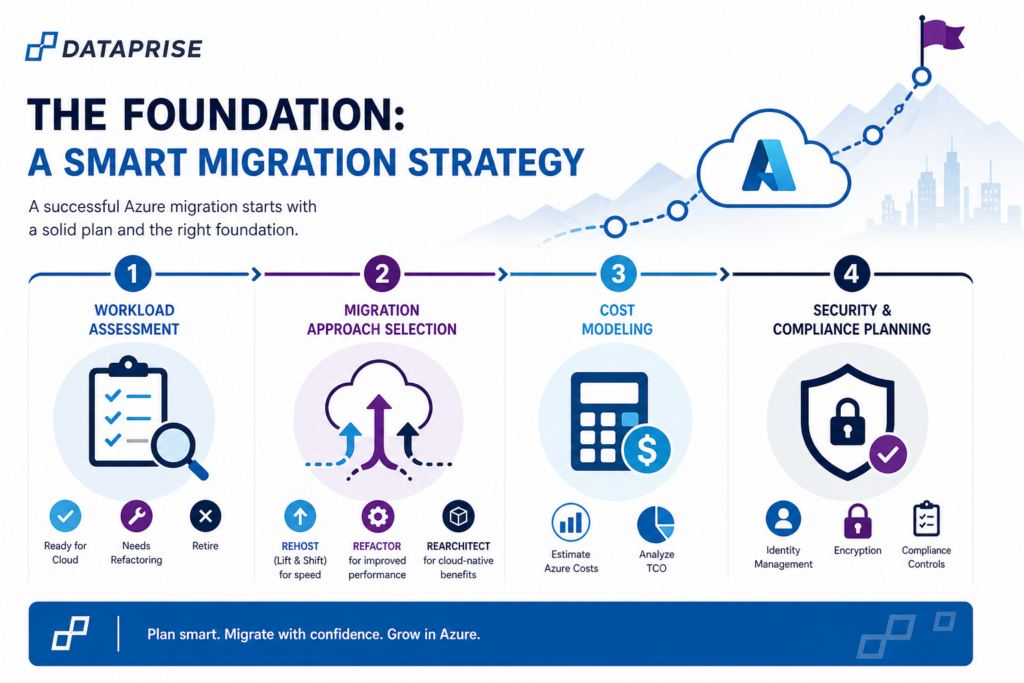
The Foundation: A Smart Migration Strategy
Before moving a single workload, it’s critical to assess your current environment and define a migration roadmap. This typically includes:
1. Workload Assessment
Identify which applications are ready for the cloud, which need refactoring, and which should be retired. Not everything belongs in Azure—and that’s okay.
2. Migration Approach Selection
Choose the right method for each workload:
- Rehost (lift and shift) for speed
- Refactor for improved performance
- Rearchitect for cloud-native benefits
3. Cost Modeling
Estimate Azure costs ahead of time using tools like pricing calculators and total cost of ownership (TCO) analysis. This helps avoid surprises post-migration.
4. Security & Compliance Planning
Ensure your Azure environment is configured with proper identity management, encryption, and compliance controls from day one.
Optimization: Where the Real Value Happens
Once your workloads are in Azure, the real work begins. Optimization is an ongoing process that ensures your environment is efficient, secure, and aligned with evolving business needs.
Here are the key pillars of Azure optimization:
1. Cost Optimization
Cloud costs can spiral quickly without visibility and governance. Azure provides tools like Cost Management and Advisor, but organizations must actively manage usage.
Best practices include:
- Rightsizing virtual machines based on actual usage
- Eliminating unused or idle resources
- Leveraging reserved instances for predictable workloads
- Implementing auto-scaling to match demand
A well-optimized Azure environment can reduce cloud spend by 20–40% without sacrificing performance.
2. Performance Optimization
Performance issues in the cloud often stem from poor architecture rather than platform limitations. Optimization focuses on ensuring workloads run efficiently and reliably.
Key tactics:
- Use load balancing to distribute traffic
- Optimize storage types based on workload needs
- Implement caching for faster data access
- Monitor performance metrics and adjust resources dynamically
3. Security Optimization
Security in Azure operates on a shared responsibility model. While Microsoft secures the infrastructure, organizations must secure their data, identities, and applications.
Optimization steps include:
- Enforcing multi-factor authentication (MFA)
- Applying least-privilege access controls
- Regularly patching and updating systems
- Using tools like Microsoft Defender for Cloud for threat detection
4. Operational Efficiency
Managing Azure effectively requires automation and visibility. Without it, IT teams can become overwhelmed.
Best practices:
- Automate routine tasks with Azure Automation
- Use Infrastructure as Code (IaC) for consistency
- Implement centralized monitoring and alerting
- Establish governance policies to enforce standards
Related Resource
Business Continuity Blueprint: Cloud and Infrastructure Strategies for an Always On World
If you’re thinking through business continuity, this is worth a deeper look. Most organizations assume they’re covered until something actually breaks. The gap usually comes down to having a tested, cloud-first strategy in place.
Common Pitfalls to Avoid
Even with the best intentions, many organizations fall into predictable traps during Azure migrations and optimization efforts:
- “Set it and forget it” mindset: Cloud environments require continuous tuning
- Overprovisioning resources: Leads to unnecessary costs
- Ignoring governance: Results in sprawl and lack of control
- Underestimating change management: Teams need training and alignment
Avoiding these pitfalls can significantly improve both ROI and user satisfaction.
The Role of Expert Guidance
While Azure provides powerful tools, navigating migrations and optimization alone can be challenging—especially for growing organizations with limited internal resources.
Partnering with Dataprise, a certified Microsoft Azure partner, can accelerate success by:
- Providing proven frameworks and best practices
- Reducing migration risk and downtime
- Continuously optimizing cost, performance, and security
- Offering strategic guidance aligned with business outcomes
Looking Ahead: Continuous Improvement
Azure optimization isn’t a one-time project—it’s an ongoing discipline. As your business evolves, so should your cloud environment. New Azure services, pricing models, and capabilities are constantly emerging, creating opportunities for further improvement.
Organizations that embrace continuous optimization gain:
- Better cost control
- Stronger security posture
- Improved application performance
- Greater agility and scalability
Final Thoughts
Migrating to Azure is a powerful step—but optimizing it is what truly unlocks its value. By taking a strategic approach to both migration and ongoing management, businesses can turn their cloud investment into a driver of innovation and growth.
If your Azure environment feels more like a burden than a benefit, it’s probably time to optimize.